MPVEX Call Center

Never Miss a Customer Call Again

Manage bigger call volumes with a smaller staff. The MPVEX Call Center routes overflow callers into intelligent queues — keeping customers engaged and your team efficient.

Uptime
0 %
Fewer missed calls
0 %
Support
0 /7

MPVEX Call Center

“We have peak times where more customers call in than we have staff available to answer them.  We absolutely don’t want our customers going to voicemail.

What can we do?

Simple…  to satisfy your need to take those calls while you may not have the agents available to answer them, we’ll just send those callers into your MPVEX Call Center.  Some people may refer to a Call Center as beefy ACD, but the MPVEX Call Center can be a significant part of any full Call Center solution.  Teleworkers, Reports, Agent Dashboard, Wall Board, etc.

Why MPVEX

Everything Your Call Center Needs

Handle More With Less

Manage a bigger call volume with a smaller staff using intelligent queue routing.

Professional Experience

Present an appealing, professional experience for every caller, every time.

Reduce Missed Calls

Eliminate those pesky missed calls and ring-no-answer experiences.

Custom Call Queues

Customize queues with specialized details to route specific inquiries.

Multiple Queues

Add Sales, Support, Customer Service and more — all managed in one place.

Monitor & Report

Track agent activity and generate detailed reports from your Metropark Voice Exchange.

Queue Marketing

Promote new campaigns to callers waiting in your call queues.

How It Works

MPVEX Call Center Call Flow

Incoming calls are intelligently routed through our system to ensure every customer gets connected.

STEP 1

Call In

Customer dials your company and is greeted by a live attendant or auto-attendant.

STEP 2

IVR

The caller hears an interactive menu and selects “Sales”, “Support”, or “Marketing”.

STEP 3

ACD

Calls are routed to an available agent or placed in the MPVEX Call Queue.

STEP 4

Queue

The caller waits in the Call Queue until the appropriate agent is available.

How It Works

MPVEX Call Center Call Flow

Incoming calls are intelligently routed through our system to ensure every customer gets connected.

Real-Time Dashboard

Monitor all queues, agent statuses, and call metrics live from any device.

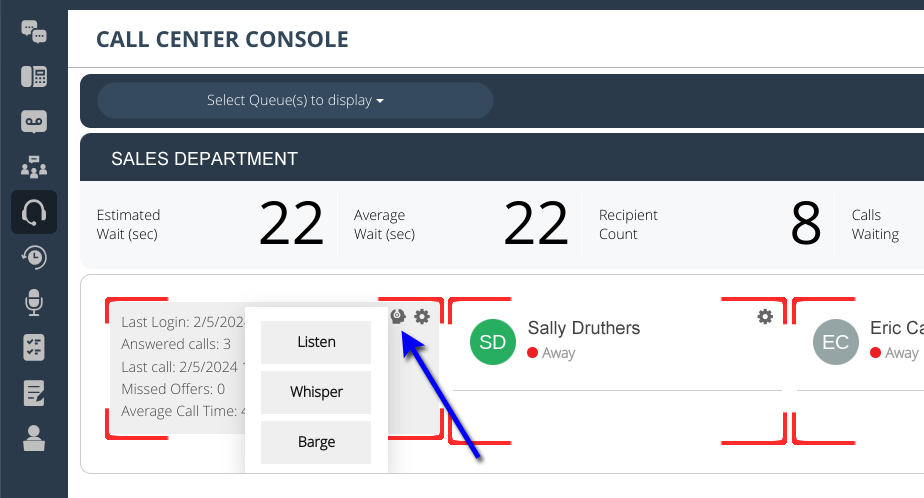
Listen

Silently monitor live calls to evaluate agent performance and quality.

Whisper

Coach agents during calls — only the agent hears your guidance.

Barge

The caller waits in the Call Queue until the appropriate agent is available.

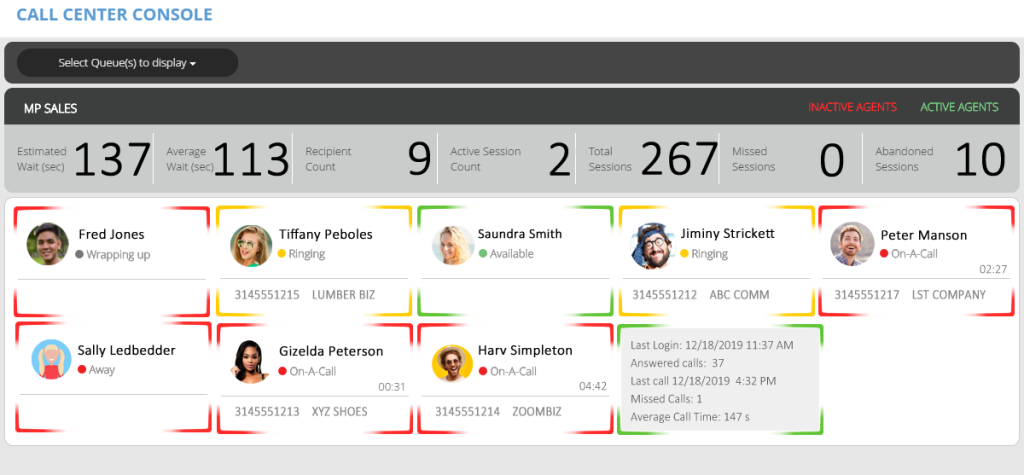
Starting at the upper left of the MPVEX Call Center Console screenshot above we can see many things:

Top Header Bar

  • We see a drop down that has all the Call Queues available for monitoring.  We can view multiple queues if needed.
  • We are looking at only one queue named MP SALES, but we can view more queues at the same time
  • We can click the Inactive Agents or Active Agents to view who is logged in or logged out

Real Time Queue Stats Bar (left to right)

  • We see the estimated wait time for the callers in queue is 2.28 minutes (137 seconds)
  • We see the average wait time of past callers today has been under 2 minutes (113 seconds)
  • We see a total of 9 agents “recipients” are selected to be in the MP SALES call queue. (active or inactive)
  • We see there are 2 callers sitting in queue “active session” or have not been picked up by an agent yet
  • We see that 267 calls or “total sessions” have been presented to the MP SALES call queue today
  • We see that no callers “0” were “missed“, rejected or timed out prior to being answered
  • We see that 10 callers who sat in queue, decided to hang up “abandoned” before we could get to them

Agent Status Screen

Fred Jones is red because he just completed a call and is in Wrap-up Mode.  A preset time that is allowed for him to complete notes of his finished call. After Wrap-Up is over, Fred will be automatically put in the Ready Mode.  He will then be Available to take calls.

Tiffany Peboles is being presented a call.  Her phone is ringing and she can see the CallerID of LUMBER BIZ.  The caller is still in the queue at this time.  If Tiffany does not answer the phone, the call will stay in the queue, and possibly ring Saundra Smith as she is logged in and an available agent.  If Tiffany is the only available agent, her phone will ring again and again.

Saundra Smith is logged in and in the Ready Mode.  She will get a call sent to her soon.

Jiminy Strickett is in the same status as Tiffany.  He was just available, but now his phone is ringing.  If he answers, he will be talking to ABC COMM.  If he doesn’t the call stays in queue and will be present to another availabe agent or will go right back to Jiminy.

Peter Manson is talking with a customer rignt now.  We can see he has been talking for 2:27 minutes to LST COMPANY.

Sally Ledbedder is logged in, but she has put herself in the Away Mode.  Maybe she’s at lunch or on a break.  She will not be presented a call from this queue until she goes back to the Ready Mode.

Gizelda Peterson just answered a call which was sent to her from the MP SALES queue.  She has been talking fro 31 seconds to XYZ SHOES.

Harv Simpleton is on a call to ZOOMBIZ. He has been talking for almost 5 minutes.

Mr. 9th Agent is currently green so he is available, but the reason this screen looks different is because we’ve touched his name and his status box flipped around to show us his stats for the day.  The last time he logged in was at 11:37 AM.  He has answered 37 calls since then.  The last call he took was at 4:32 PM.  He has missed one call so we’ll want to ask about that, and his average call time is 2.45 minutes.

MPVEX Call Center: Listen, Whisper, & Barge

The MPVEX Call Center is a cutting-edge communication solution designed to enhance the efficiency and effectiveness of call center operations. This technical brief highlights the importance of utilizing the Listen, Whisper, and Barge features within the MPVEX Call Center to optimize agent performance, improve customer interactions, and ultimately elevate overall call center functionality.  More…

Reports

Powerful Console Reports

Comprehensive reporting tools to analyze performance and make data-driven decisions.

Queue Calls

View call details for all or each agent — caller ID, dialed number, agent name, queue, duration.

Queue Summary

Total calls received, missed calls, abandoned calls, and average wait time per date.

Queue Detail

Calls offered, answered, abandoned with percentages, average call time, and total call time.

Agent Actions

Track agent time in queue, on calls, away, and logged out with per-action breakdowns.

Agent Actions

Track agent time in queue, on calls, away, and logged out with per-action breakdowns.

Agent Performance

Queue calls taken, handle time, non-queue calls, outbound call time, and outbound call count.

Schedule Appointment with Metropark

Fill out the form below, and we will be in touch shortly.